Friday, March 31, 2023

VAC - Advanced Excel Techniques - Date Functions

Date Functions are helpful to work around the date and time.  The following are the few of the date functions available in the Excel. 

The main function to calculate dates in Excel:

  • DATE function


Get current date and time:

  • TODAY - returns today's date
  • NOW - returns the current date and time


Convert dates to / from text:

  • DATEVALUE - converts a date in the text format to date format
  • TEXT - converts a date to a text value


Retrieve dates in Excel:

  • DAY - returns the day of the month
  • MONTH - returns the month of a specified date
  • YEAR - returns the year of a specified date
  • EOMONTH - returns the last day of the month
  • WEEKDAY - returns the day of the week
  • WEEKNUM - returns the week number of a date


Calculate date difference:

  • DATEDIF - returns the difference between two dates
  • EDATE - returns a date N months before or after the start date
  • YEARFRAC - calculates the fraction of the year between 2 dates  (it is used to calculate the age by providing the date of Birth and today date).


Calculate workdays:

  • WORKDAY - returns a date N working days in the future or in the past
  • NETWORKDAYS - returns the number of workdays between two dates

Thursday, March 16, 2023

VAC - Advanced Excel Techniques - Sorting & Filter

 Sorting and filtering are two important features available in Microsoft Excel.  It is widely used for the data analysis.  With these two features, the data shall be organized, arranged and filtered.

References: 

1. https://www.simplilearn.com/tutorials/excel-tutorial/how-to-sort-data-in-excel

2. https://www.futurelearn.com/info/courses/data-analytics-for-business-creating-databases/0/steps/177397

3. https://www.learnexcelnow.com/sorting-and-filtering-data-with-excel/


VAC - Advanced Excel Techniques - Functions

 Excel provides rich set of built in functions.  The following are the list of categories of functions.

  • Financial Functions
  • Logical Functions
  • Text Functions
  • Date and Time Functions
  • Lookup & Reference Functions
  • Math Functions
  • Statistical Functions
  • Information Functions 
  • Web
  • Cube
  • Trigonometric


To insert a function

Select the Cell
Goto Function Wizard and select the function  
Give values / cells for the parameters.

The following are the web resources gives you detailed information and  usage of the functions.

Tuesday, March 14, 2023

VAC - Advanced Excel Techniques - Conditional Formatting

 In this post, you can know how to work with Conditional Formatting

Conditional Formatting

·         Conditional formatting is used to change the appearance of cells in a range based on your specified conditions.

·         The conditions are rules based on specified numerical values or matching text.

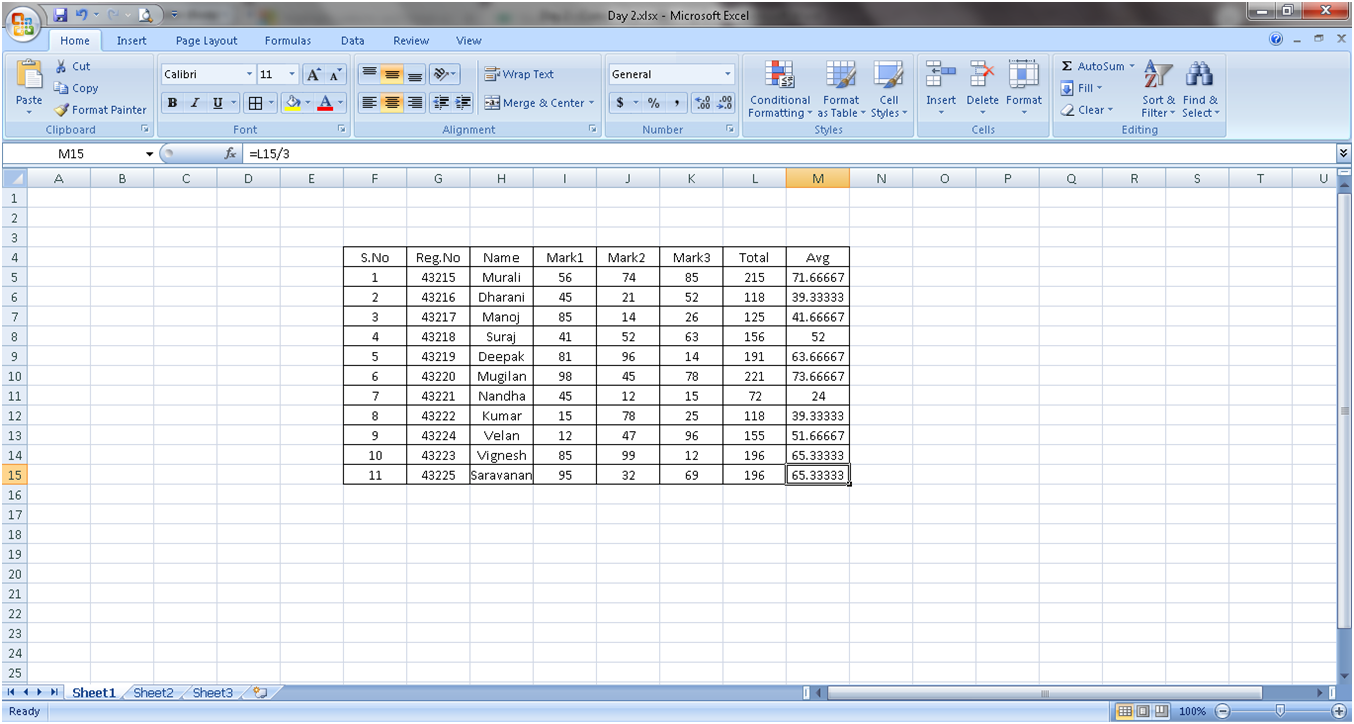
First create a table of data as shown in the following


Apply the formula for total and Average

For total in the Cell L5    type the following

=I5+J5+k5

For average in the cell M5 type the following

= L5/3.0


Now the total and Average is calculated.

Now you can format the Column M via color scale based on the values.

Step 1 : Select the value M5 to M15

Step 2 : Click conditional Formatting in the Style (group) of Home Toolbar.


Select Color Scales and select the color pattern you want.


Similarly, you can apply the following  


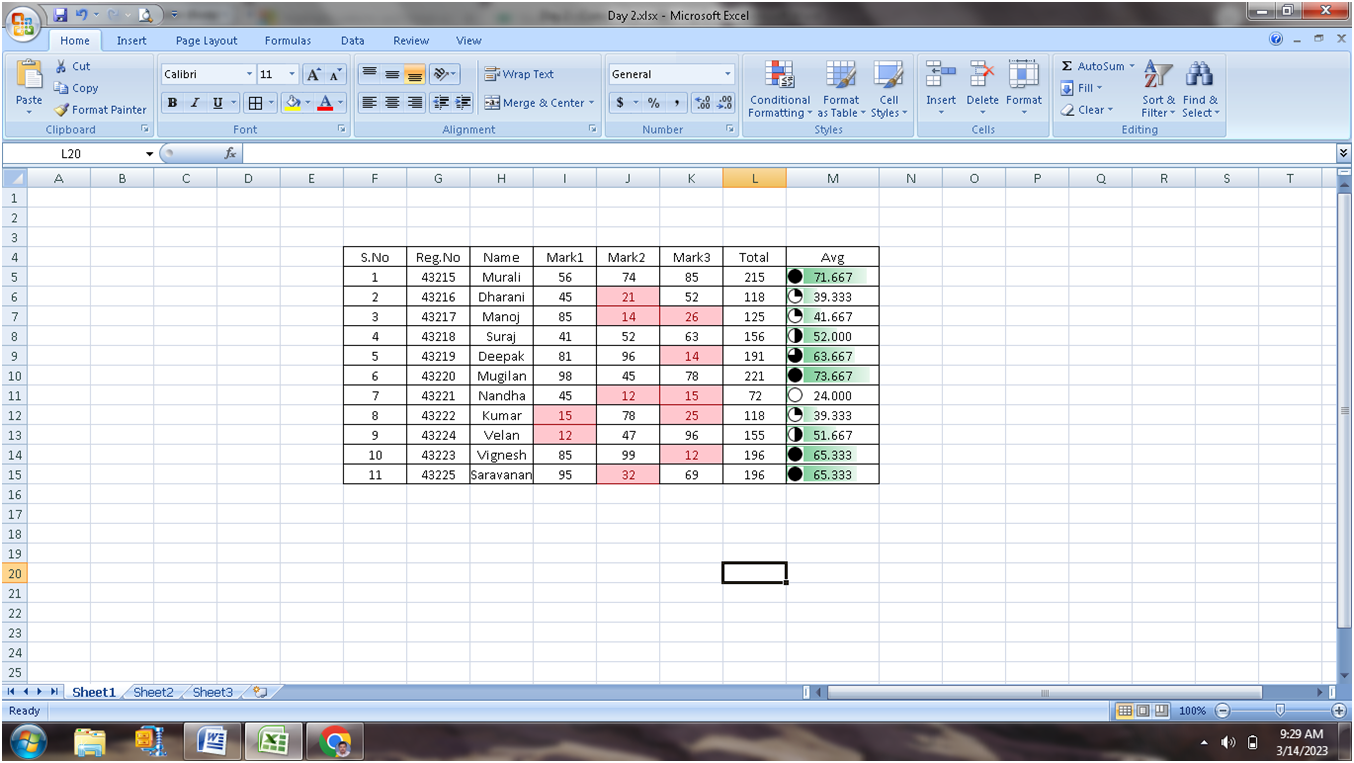
Highlight the cell, if the cell value is greater than or lesser than the value mentioned.


Marks are selected from I5 to K15.

Select the Highlight Cells Rules, Select Less than.   (The objective is to highlight the marks which are less than 40).


Now apply Databar.

Select the Average – M5 to M15 and

Select the Conditional Formatting and Click Data Bar


Select the Color and show the data bar appeared in each cell.


Each value has the bar based on the value.


Try ICON SETS


Based on the cell Value the Icon will be appeared in front of the value.

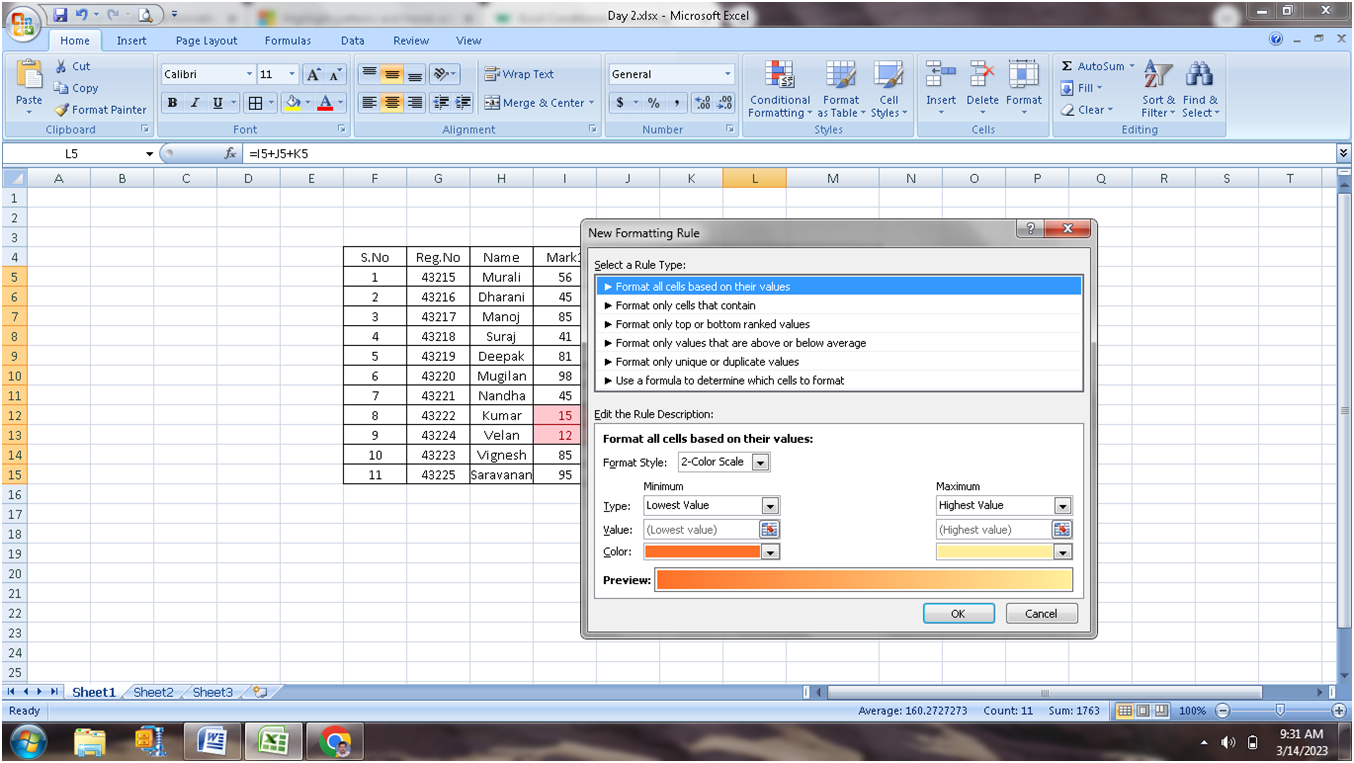
Creating New Rule:

1.       Select Total Column

2.       Select New Rule


3.       Click New Rule


For the total between 100 to 200 is to highlighted with Red Border – Yellow background and text in Blue Color.


Click format and select the color needed.


Click OK to apply the format


 Clear the Rules:

 Formatting applied in the sheet shall be cleared either as whole for the entire sheet or clear for the selected cells.


Click “clear rules from Selected Cells”


To View all the Formatting rules applied

Click Manage Rule in the Conditional Formatting Submenu.

Show formatting rules for the “This Worksheet”

From here you can create new, modify the existing and delete the rules.

Kindly practice the same and get expert in formatting the data.


Tuesday, March 7, 2023

VAC - Advanced Excel - Session 1 - Excel Basics

 Session 1 : Formatting & Managing your Worksheet & workbook


VAC - Advanced Excel - Session Topics


Name of the Course : Advanced Excel Techniques

Duration of the Course : 30 Hours

Pre-Requisite:

·         Must know the fundamentals of Excel – Workbook, Sheet, Cell, Saving Workbook.

·         Commitment to spend at least two hours per week practicing the skills introduced in the course.

Course Objective:

·         master the skills of working with: diagrams, Microsoft Excel and sorts;

·         learn to use this software confidently;

·         understand the advanced functions of Excel: the user interface of Excel

·         Ability to competently navigate the Excel user interface; performs basic calculations using formulas and functions, professionally format spreadsheets and create data visualizations using charts and graphs.

Course Outcome:

·         Speedy data analysis

·         Better Understanding of Excel functionalities

·         Time Saving in data processing

·         Reaching deep into data and seeing the unseen truth

·         Learn to present data in better and understanding way

Topics Covered:

EXCEL BASICS - FORMATS, CONDITIONAL FORMATTING & SORTING - DATA MANAGEMENT - FORMULAS & FUNCTIONS - CHART & GRAPHS - DATA ANALYSIS (Pivot Table)

Topic

Formatting & Managing your Worksheet & workbook

Basic Formulas, Number Formats & Working

Conditional Formatting Data Bars, Colour Scales & Icon Sets,

Conditional formatting with formulas

Sorting basic & advance

Filters Basic & Advance

Data from other Sources

Data Validation and dealing with Invalid Data

Text Formulas : Exact, Find, Upper, Proper, Left, Right, Mid & many more

Lookup Formulas : Vlookup, Hlookup, Lookup, Match etc..

Logical Formulas: If, AND, OR, NOR etc…

Date & Time Formulas : Today, Now, Years, etc..

How & when to apply Nested Functions

Chart Basics: What, When & How

Line Chart - Column Chart

Creating a PivotTable

Selecting What Appears in a PivotTable

Scenario Modelling

Goal Seek

Macro – Recording a Macro


Thursday, March 2, 2023

SQL - Structured Query Language - DDL - DML - DCL - TCL Commands

 Structured Query Language (SQL) is desinged for the retrieval of data from the database.  Also it is used to manage the data in the database. SQL is also called as Database Langugae.  It is english like so easy to human understanding. 

Databases like - Oracle, MS Access, MySQL, PostgreSQL, MS SQL uses SQL as a standard language for database management.

For the management and retrieval of data from database, SQL has the following categories of commands.

  • DDL - Data Definition Language
  • DML - Data Manipulation Language
  • DCL - Data Control Language
  • TCL - Transaction Control Language

The following tutorials will give detailed explanation on each of the SQL Commands.

  • DDL - Create, Alter, Drop, Truncate
  • DML - Select, Insert, Update, Delete
  • DCL - Grant, Revoke
  • TCL - Commit, Rollback

Tutorials :  Geeksforgeeks    Javatpoint

Wednesday, March 1, 2023

How to access Live SQL provided by Oracle?

 Dear Students,

Kindly follow the below steps to access the Live SQL provided by Oracle.

In order to access the Oracle - Live SQL, Oracle account is required.  Kindly follow the URL provided below to create an oracle account.

To create Oracle Account :  https://docs.oracle.com/en/cloud/get-started/subscriptions-cloud/csgsg/get-oracle-com-account.html

Once the Oracle Account is created, then 

Step 1 : Click the link https://livesql.oracle.com/


Step 2 : Click Sign in (top-right of the screen).

Step 3 : Enter the Username and Password of the Oracle Account created earlier.
Step 4 :  Click Start Coding
Step 5 :  In the SQL Worksheet - Try the DDL & DML SQL Query statements.


Monday, December 12, 2022

Digital Transformation

 Digital transformation is not simply duplicating existing processes in digital form; the in-depth analysis of how the business operates helps organizations discover how to improve their processes and operations, and harness the benefits of integrating data science into their workflows.

Most organizations realize that digital transformation will require fundamental changes to their approach towards data, employees, and customers, and it will affect their organizational culture. Digital transformation impacts every aspect of the organization, so it is handled by decision makers at the very top levels to ensure success.


Sunday, July 30, 2017

Why and When Should One Start Learning C#?

This post may be interesting for those who are just thinking of starting to learn programming, but are afraid to take the first steps because of the difficult, according to some opinions, theory.
For those who are willing to master a new sphere of knowledge and apply it in work – I’ll just mention – it's never too late to start learning – let it be programming or something else! If you have the motivation, desire to learn and the chosen subject area – just start learning!
Here, I’d like to tell a couple of words in favor of C# (C Sharp) technology. In the other articles, here at my blog, you may read professional materials on C# programming.
Now, let’s figure out why one should consider learning C# programming language?
     C# is a fairly young programming language. It appeared about 14 years ago and derived from C. So, it is a modern programming language, which gives the specialist, mastered it, an advantage on the IT market. Besides, there are a huge number of powerful libraries, tools for unit testing, and whatever else you need to create C# code.
     Unlike C, which is a low-level programming language, C# is a high-level language and the one easy to start with (in my opinion).
     C# is an object-oriented programming language. It gives the programmer a possibility to work on a high level of abstraction, which makes work much more effective. You don’t need to bother about memory allocations and many-many other low-level problems.
     It is extremely popular in different areas, based on C# you can create games, desktop application, and websites.
     C# is on 9 positions higher that Java and on 7 positions higher than C++ in a Most Loved programming languages category in Stackoverflow Developer survey.
This list of C# benefits may be continued, you are welcome to leave your vision on this topic in comments below the post.
Talking about learning C# for absolute beginners, there are many ways to do this:
1.      A professional approach is to apply to university program for Computer Sciences, where you’ll study all related subjects.
2.      Apply for a paid course, where a coach \ teacher – former or a current software developer will teach you with a group of people, and share his experience and knowledge.
3.      Start online programming course yourself. It may be a free or a paid one, you can find a bulk of them on the Internet. Here, I’d like advice free C# tutorial for absolute beginners – Codeasy.net, where you learn while reading an adventure story and fight with machines side-by-side with the characters of the story. It may be a good start for complete beginners, who are afraid of dry and complicated technical theory. Besides, this tutorial has practical tasks, so one can practice coding while reading the story. 

No matter which way you’ll choose, if you have the desire, hard working will lead you to success. Even if you want to try yourself as a programmer for self-development or as a hobby, then it's certainly never too late.

(Thanks to Julia Rybalkina @rybkayulia@gmail.com - Codeasy.)

Sunday, March 20, 2016

PHP and MySQL tutorial

PHP is the most popular scripting language for web development. It is free, open source and server-side (the code is executed on the server). MySQL is a Relational Database Management System (RDBMS) that uses Structured Query Language (SQL). It is also free and open source. The combination of PHP and MySQL gives unmet options to create just about any kind of website - from small contact form to large corporate portal.

PHP tutorial 1


Tuesday, September 8, 2015

Mobile Hardware and Servicing - Unit I - Part A

 PART – A (2 Marks)
(Minimum of 20 Questions in each Unit of type MCQ, True or False or open question type, no maximum limit)

Unit – I
1.      -----------------is  the inventor of the first portable handset.
a) Alexander Graham Bell      b) Thomas Alva Edison          c) Dr.  Martin Cooper             d) None
Answer: c) Dr.  Martin Cooper

2.      Expansion of GSM
a)      Global System for Mobile Communications        
b)      Global Standard for Mobile Communications
c)      General  System for Mobile Communications
d)     None
Answer: a) Global System for Mobile Communications

3.      CDMA stands for
a) Code Direct Multiple Access          b) Central Division Multiple Access
c) Code Division Multiple Access      d) None of these
Answer: c) Code Division Multiple Access

4.      GPRS stands for
a)      General packet radio system         b) General packet radio service
c)      General packet radio station         d) None
Answer: b) General packet radio service

5.      1G support only the _____________ Technology
a)      Digital       b) Analog        c) Both a)&b)  d)None
Answer: b) Analog

6.      Current measured in __________
a)      ampere  b) Volt     c) ohm             d) None of these
Answer: ampere 

7.      Voltage measured in____________
a)ampere  b) Volt        c) ohm             d) None of these
Answer: b) Volt

8.      Resistance  measured in____________
a)ampere  b) Volt        c) ohm             d) Mhz
Answer: c) ohm

9.      _________ is a passive two-terminal electrical component used to store energy electro statically in an electric field
a)Diode           b) Resister                  c) Capacitor   d) Transformer
Answer: c) Capacitor

10. ____________resists the flow of current in an electronic circuit
a)Diode           b) Resister                  c) Capacitor   d) Transformer
Answer: b) Resister

11.  _______is an electronic device that can allow the electric current to flow in one direction only
a)Diode           b) Resister                  c) Capacitor   d) Transformer
Answer: b) Resister

12.  Which components convert the sound waves to digital signal_________
a) Speaker       b) Microphone             c) vibrating motor       d) none
Answer:  Microphone
           
13.  Which components convert the digital signal to sound waves------------
Answer: a) Speaker

14.  ____________ is the important component of microphone
a) Silicon         b) diaphragm   c) resister         d) none
Answer: b) diaphragm

15.  LED stands for__________
a) Light Emitting Diode         b) Light Emitting Digital
c) Light Electrical Diode        d) none
Answer: a) Light Emitting Diode

16.  TFT stands for___________
a) Thin Film Transistor   b) Thin Film Transformer     c) Thick Film Transistor          d) None
Answer: a) Thin Film Transistor  

17.  ___________ is a safety device that lies in series in a circuit between an electrical source and its associated load.
a) diode           b) capacitor     d) fuse             d) resister
Answer: d) fuse        

18.  quartz crystal used to
a) Keep time                b) charging      c)filtering        d) None
Answer: a) Keep time          

19.  Capacitor unit measured by
a) Ampere       b) Volt             c) Farad           d) none
Answer: c) Farad     

20.  _________ is an instrument used to check for AC or DC voltages
a) Multimeter              a) Speaker       b) Microphone             c) vibrating motor

Answer: a) Multimeter